

OpenAI Codex Now Works Directly Inside Google Chrome
 By Inflix
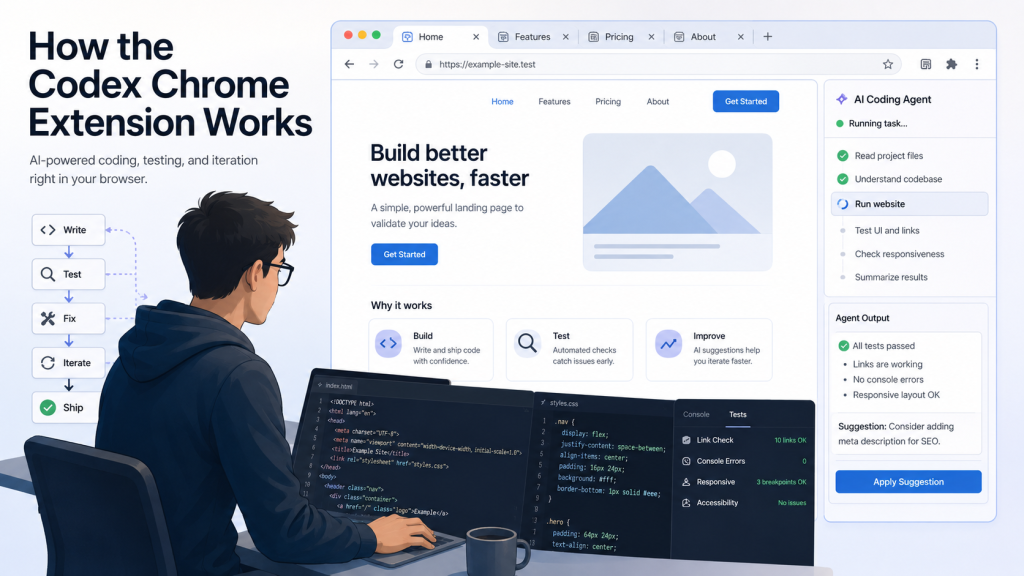
 OpenAI Codex Google Chrome support is now becoming a useful update for developers who want AI help inside real browser workflows. With the Codex Chrome extension, users can connect Codex with Google Chrome to handle browser-based tasks, test websites, work with signed-in tools, and speed up everyday development work.
This matters because a lot of modern development work does not happen only inside a code editor. Developers test websites, check dashboards, review internal tools, update CRM platforms, inspect frontend changes, and move between different browser-based apps every day. Until now, AI coding agents were strongest inside IDEs, terminals, or cloud coding environments. With Chrome support, Codex is moving closer to the real workflow developers actually use.
OpenAI confirmed the Chrome extension update in its Codex changelog on May 7, 2026, saying Codex can now work better with apps and websites in the browser, run tasks across tabs in the background, and give users control over which websites Codex can access.
What Is OpenAI Codex Google Chrome Support?
OpenAI Codex is an AI coding agent designed to help developers write, review, debug, and ship code faster. It can understand codebases, suggest changes, fix bugs, review logic, and automate repetitive development tasks. OpenAI describes Codex as its coding agent for software development, included with ChatGPT Plus, Pro, Business, Edu, and Enterprise plans.
In simple words, Codex is not just a chatbot that gives code snippets. It is built to work inside real development environments. It can read project files, understand structure, run tasks, and help with practical coding work.
That is why Chrome support is important. Developers do not only need help writing code. They also need help checking whether that code works in a browser, testing interfaces, reviewing web apps, and handling online tools that are part of the job.
How the OpenAI Codex Google Chrome Extension Works
The new Codex Chrome extension lets Codex use Google Chrome when a task requires access to websites where the user is already signed in. OpenAI gives examples such as LinkedIn, Salesforce, Gmail, and internal tools.
This means Codex can help with browser-based workflows that would normally require a developer or team member to open Chrome, click through pages, read information, and take action manually.
For example, a user could ask Codex to open a business tool, review information from a webpage, or work with a logged-in dashboard. The big advantage is that Codex can use the browser context that already exists in Chrome, instead of being limited to public pages or disconnected coding environments.
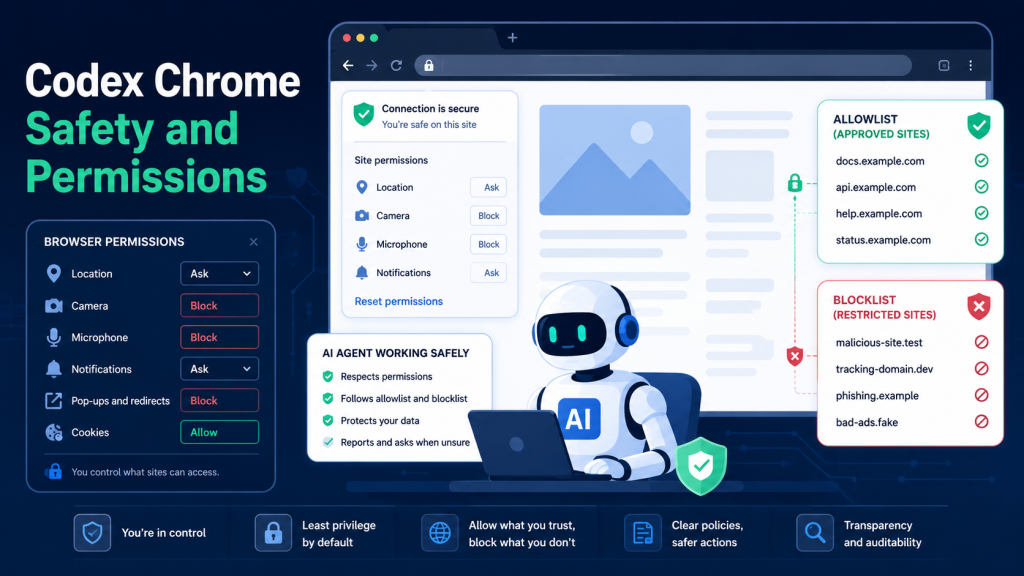
But this does not mean Codex gets unlimited access by default. OpenAI says Codex asks before interacting with each new website unless the user has already allowed that domain. Users can allow access for the current chat, always allow a host, or decline access.
That permission control is important because browser access can involve sensitive data.
Why OpenAI Codex Google Chrome Access Matters for Developers
This update is useful because it connects AI coding help with real browser-based development work.
A developer building a website often needs to test the frontend in Chrome, check layout issues, inspect errors, confirm changes, and compare the live result with the expected design. If Codex can work with Chrome, it becomes more useful for practical testing and debugging.
OpenAI has already been expanding Codex beyond basic coding. In April 2026, OpenAI announced a major Codex update that added broader computer use, more app support, image generation, memory, plugins, and an in-app browser for faster frontend iteration.
The Chrome extension continues that direction. It brings Codex closer to the messy reality of software work, where developers jump between code, browser previews, project tools, issue trackers, documentation, internal dashboards, and communication platforms.
For more updates like this, read our latest AI news on Mobile Verse.
Is the OpenAI Codex Chrome Extension Safe?
One of the most interesting parts of the Chrome update is that Codex can work in parallel across Chrome tabs in the background. OpenAI says it does this without taking over the user’s browser.
That sounds small, but it is a serious productivity improvement.
A developer could continue working while Codex checks something in another tab group. For teams, this could reduce time spent on repetitive browser checks, dashboard updates, and manual verification tasks.
Still, users should not blindly trust the agent. AI agents can misunderstand page content, click the wrong option, or act on misleading information. OpenAI itself warns users to treat page content as untrusted context and review websites before allowing Codex to continue.
That warning is not decoration. It is practical advice.
How to Set Up Codex in Chrome
OpenAI says users can set up the Chrome extension from Codex by opening Codex, going to Plugins, adding the Chrome plugin, following the setup flow, and confirming the extension shows as connected in Chrome.
After setup, users can start a new Codex thread. Codex may suggest Chrome when a task needs a signed-in website. Users can also call it directly in a prompt, such as asking Chrome to open a business tool and update something from notes.
Chrome tasks run in tab groups, which helps keep the work organised by thread. That is a smart detail because browser automation can quickly become messy if tabs are scattered everywhere.
What About Privacy and Permissions?
This is the part users should pay attention to.
Chrome may ask users to approve extension permissions such as access to the page debugger, reading and changing website data, browsing history, bookmarks, downloads, notifications, native applications, and tab groups. OpenAI says these permissions allow the extension to operate browser workflows, but Codex still uses its own confirmations, settings, allowlists, and blocklists before using websites or browser history during a task.
In plain English: the extension may request broad Chrome permissions, but Codex is designed to ask before using specific websites unless the user changes settings.
You can also explore more tech news for the latest updates on AI tools, apps, and software.
OpenAI also says it does not store a separate complete record of Chrome actions from the extension. Browser activity is stored only when it becomes part of the Codex context, such as text read from a page, screenshots, tool calls, summaries, messages, or other content included in the thread.
That is better than storing everything, but users should still be careful. Do not give Codex access to private dashboards, financial accounts, customer records, or internal tools unless the task truly requires it and you are actively reviewing what it does.
Codex Chrome Extension vs In-App Browser
OpenAI makes a clear distinction between the Codex Chrome extension and the Codex in-app browser.
For public pages, local development servers, and file-backed previews that do not need signed-in Chrome access, OpenAI recommends using the in-app browser first. The Chrome extension is mainly useful when Codex needs the user’s signed-in browser state.
That means developers should not use Chrome access for everything. Use the lighter, safer option when possible. Use Chrome only when the task needs logged-in access or browser context that Codex cannot get elsewhere.
This is the right approach. Giving an AI agent more access than needed is bad security practice.
Who Will Benefit Most?
The Codex Chrome extension is most useful for developers, product teams, QA testers, startup founders, and technical operators who already use browser-based tools every day.
Frontend developers can use it to test pages and review UI behaviour. QA teams can use it for repetitive browser checks. Product teams can use it to work with dashboards or internal tools. Technical founders can use it to move faster across web apps without constantly switching tasks.
However, this is not a magic replacement for developers. Codex can help with browser tasks, but humans still need to review sensitive actions, confirm results, and make final decisions.
Anyone pretending this removes the need for developer judgment is overselling it.
According to the official OpenAI Codex changelog, the Chrome extension helps Codex work with apps and websites in the browser.
The Bigger Picture: AI Agents Are Moving Beyond Chat
The Codex Chrome extension shows where AI tools are heading. AI assistants are no longer just text boxes that answer questions. They are becoming agents that can work across apps, browsers, terminals, and development environments.
OpenAI’s recent Codex updates show the same trend. Codex can now work across more parts of the software development lifecycle, including writing code, reviewing files, using tools, handling browser workflows, and supporting longer-running tasks.
For developers, this could mean less time spent on repetitive work and more time spent on planning, architecture, product decisions, and reviewing final output.
But the risk is also clear. The more access an AI agent has, the more important permissions, security, and human review become.
Final Thoughts
OpenAI Codex working with Google Chrome is a meaningful update, not just another small extension launch. It makes Codex more useful for real-world development workflows because modern software work depends heavily on browser-based tools.
The Chrome extension gives Codex the ability to work with signed-in websites, browser tabs, and web apps while keeping users in control through website approvals, allowlists, blocklists, and permission settings.
The smart way to use it is simple: let Codex handle repetitive browser and development tasks, but do not hand over sensitive workflows blindly. Use the in-app browser when possible, use Chrome when needed, and review important actions before trusting the result.
For developers and teams already using Codex, this update could save time and reduce friction. For everyone else, it is another sign that AI coding agents are quickly becoming part of everyday software work.
FAQs
Does OpenAI Codex now work inside Google Chrome?
Yes. OpenAI has introduced a Codex Chrome extension that lets Codex use Chrome for browser tasks, especially when signed-in browser access is needed.
Is the Codex Chrome extension available as a normal Chrome extension?
OpenAI’s documentation says users set it up from Codex by adding the Chrome plugin and following the setup flow. After setup, the extension should show as connected in Chrome.
Can Codex access every website automatically?
No. By default, Codex asks before it interacts with each new website. Users can allow access for one chat, always allow a host, or decline access.
Is Codex Chrome extension safe to use?
It can be useful, but users should be careful. Browser tasks may involve sensitive data, so users should review permissions and avoid giving Codex unnecessary access.
What is the difference between Codex Chrome extension and Codex in-app browser?
The in-app browser is better for public pages, local previews, and tasks that do not need signed-in Chrome access. The Chrome extension is useful when Codex needs your logged-in browser state.


