Samsung has started rolling out the Samsung One UI 8.5 update, and Galaxy users finally have a clearer idea of which devices are getting it first, what new features are included, and how to check for the update manually.
This is not just a small visual refresh. One UI 8.5 brings deeper Galaxy AI integration, smarter suggestions, improved customisation, privacy upgrades, and a cleaner user experience across supported Samsung phones and tablets.
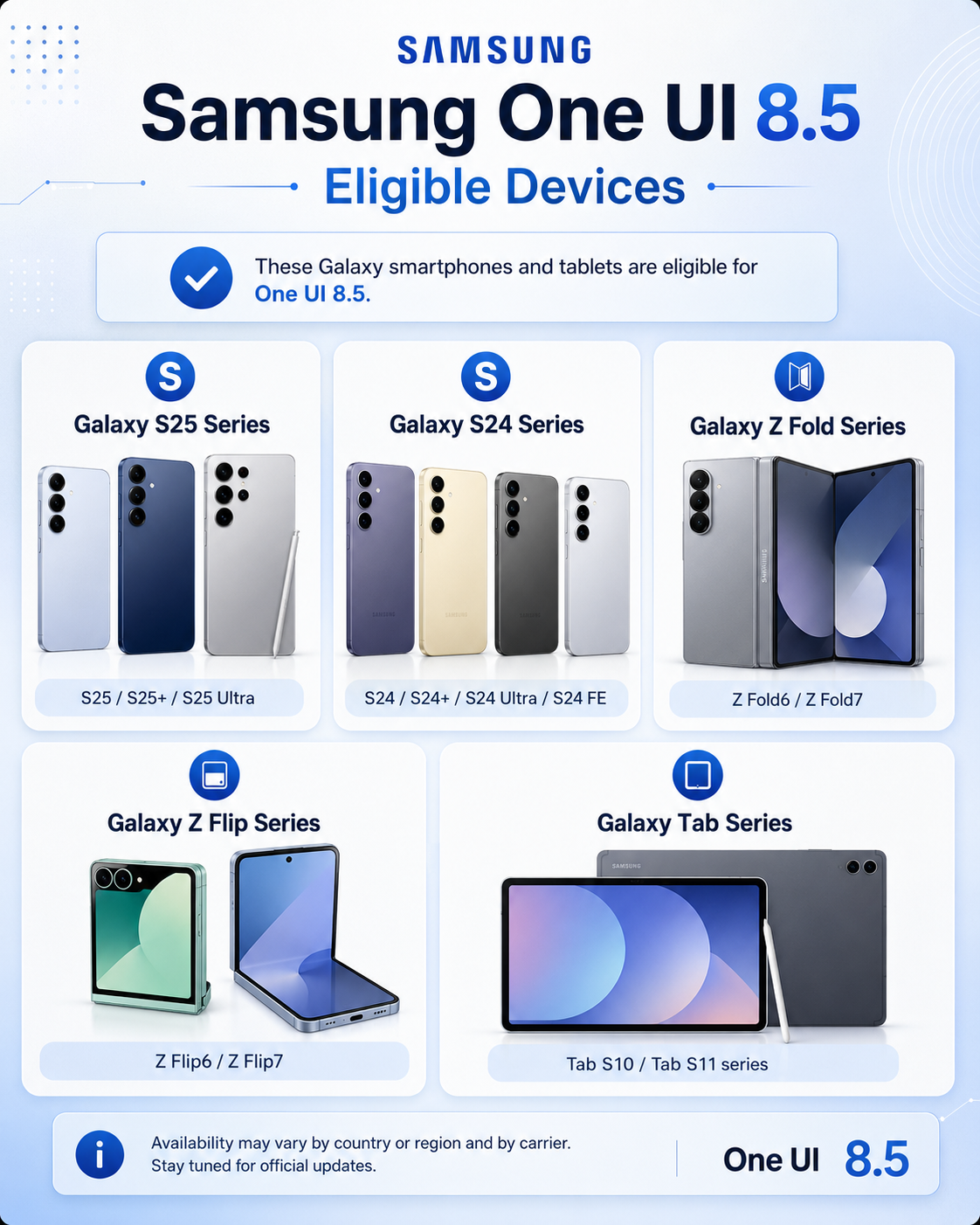
Samsung confirmed that the One UI 8.5 rollout started on May 6, 2026, beginning in Korea, with more regions following afterwards. The company also confirmed that the update is expanding to devices including the Galaxy S25 series, Galaxy S25 FE, Galaxy S24 series, Galaxy S24 FE, Galaxy Z Fold7, Galaxy Z Flip7, Galaxy Z Fold6, Galaxy Z Flip6, Galaxy Tab S11 series and Galaxy Tab S10 series.
For Galaxy users, the big question is simple: is your phone getting One UI 8.5, and should you install it immediately? Let’s break it down clearly.
What Is Samsung One UI 8.5?
One UI is Samsung’s custom Android interface. It controls how Galaxy phones and tablets look, feel and work. Every major One UI update usually brings design changes, new features, security improvements and better Samsung app integration.
The Samsung One UI 8.5 update is focused heavily on AI. Samsung says One UI 8.5 is designed to help users get through the day quicker with instant assistance, deeper Galaxy AI integration and more personalised suggestions.
In simple words, Samsung wants your Galaxy device to feel more helpful. Instead of only opening apps and changing settings manually, One UI 8.5 tries to predict what you may need next and gives you faster ways to complete common tasks.
That sounds useful, but let’s be honest: AI features are only valuable if they save time in real life. A fancy feature that nobody uses after one day is not a real upgrade. The good news is that some One UI 8.5 features, especially Photo Assist, Now Nudge and Quick Panel customisation, look practical for everyday users.
Samsung One UI 8.5 Eligible Devices
Samsung has confirmed the first group of Galaxy devices included in the One UI 8.5 rollout.
The confirmed devices include:
- Samsung Galaxy S25 series
- Samsung Galaxy S25 FE
- Samsung Galaxy S24 series
- Samsung Galaxy S24 FE
- Samsung Galaxy Z Fold7
- Samsung Galaxy Z Flip7
- Samsung Galaxy Z Fold6
- Samsung Galaxy Z Flip6
- Samsung Galaxy Tab S11 series
- Samsung Galaxy Tab S10 series
Samsung also says availability and timing may vary by market and model, so not every eligible device will receive the update on the same day.
This is important. Some blogs will publish huge “eligible device” lists just to chase traffic. That is risky because expected devices and confirmed rollout devices are not the same thing. For this post, the safer SEO strategy is to focus on the devices Samsung has officially named, then mention that more devices may follow later.
Samsung’s latest One UI 8.5 update brings new Galaxy AI features, eligible device support and easier update options for users, so before installing it, check Samsung’s official One UI page and the official Samsung Newsroom rollout announcement for confirmed details. You can also read our related Mobile Verse guides on Samsung Galaxy phones, Android updates, and Galaxy AI features to understand whether this update is worth installing on your device.
Why Your Galaxy Phone May Not Have One UI 8.5 Yet
If your Galaxy phone is eligible but the update is not showing, do not assume something is wrong.
Samsung updates usually roll out in phases. One region may get the update first, while another region may receive it days or weeks later. Carrier-locked models can also take longer because mobile networks often test updates before releasing them.
Samsung clearly states that timing may vary by market and model.
So if your Galaxy S24, Galaxy S25, Galaxy Z Fold or Galaxy Tab has not received One UI 8.5 yet, the best move is to wait and check again later. Do not download random update files from unofficial websites. That is not clever; that is how people damage their phones or create software problems.
Main Samsung One UI 8.5 Features
The Samsung One UI 8.5 update brings several useful changes, especially around Galaxy AI, customisation, privacy and everyday usability.
Here are the most important features.
1. Deeper Galaxy AI Integration
Samsung says Galaxy AI is now integrated deeper into One UI 8.5. The update is designed to understand usage patterns and provide a more personalised experience.
This means the phone can become better at offering useful suggestions based on what you are doing. For example, instead of forcing you to jump between apps, One UI 8.5 may suggest the next useful action at the right moment.
This is the direction smartphones are clearly moving in. Phones are no longer just devices for opening apps. They are becoming AI-powered assistants that try to reduce manual steps.
Still, users should keep expectations realistic. AI features can be helpful, but they are not magic. Some tools will feel useful, while others may depend on your region, language, apps and device model.
2. Photo Assist Improvements
Photo Assist is one of the most practical Galaxy AI features in One UI 8.5.
Samsung says Photo Assist lets users describe what they want in natural language, then Galaxy AI can help edit the photo by adding objects, removing background distractions or adjusting the mood of the image.
This is useful for normal users who want better photos without learning advanced editing software. For example, if a photo has an unwanted object in the background, Photo Assist may help remove it. If the photo mood looks dull, Galaxy AI may help adjust it.
However, Samsung also notes that AI feature availability can vary depending on device model, language or region. So do not assume every Galaxy phone will get every AI tool in the exact same way.
3. Now Nudge
Now Nudge is another important One UI 8.5 feature.
Samsung says Now Nudge uses real-time on-screen recognition and personalised data to provide helpful suggestions. It can understand what is happening on your screen and suggest the next step.
For example, if you are messaging someone about a plan, Now Nudge may help suggest related actions. Samsung says it can help users schedule meetups, find old photos and take action directly from the current context.
This is the type of AI feature that could actually become useful because it works inside daily phone use. People do not want AI buried inside a separate app. They want it to appear when it saves time.
4. AI Agent
One UI 8.5 also includes AI Agent features designed to help with tedious tasks.
Samsung says AI Agent can help users get things done faster by letting them tap or enter a short prompt.
This could be useful for small actions that normally require several steps. For example, changing settings, finding information or completing a task may become quicker if AI Agent understands the request correctly.
Again, this depends on how well Samsung executes it. A good AI assistant saves time. A bad one just becomes another feature people ignore. The real test will be how useful it feels after a few weeks of use.
5. Customised Quick Panel
One UI 8.5 gives users more control over the Quick Panel.
Samsung says users can add, delete, move and resize Quick Panel items. This makes it easier to access favourite controls quickly.
This is one of the most underrated changes. The Quick Panel is something Galaxy users open every day for Wi-Fi, Bluetooth, brightness, sound, hotspot, screen recording, power saving and other controls.
A cleaner Quick Panel means less scrolling and fewer unnecessary buttons. That is a real usability improvement, not just a marketing feature.
6. Better Lock Screen and Wallpaper Layout
Samsung has also improved wallpaper and Lock screen customisation in One UI 8.5.
When setting a wallpaper, One UI 8.5 can automatically reposition the image so important parts do not overlap with the clock, widgets or apps.
This sounds small, but it improves the overall look of the phone. Many users set a wallpaper and then realise the clock or widgets cover the main subject. One UI 8.5 tries to fix that by creating a cleaner layout automatically.
It is not a headline feature, but it is the kind of small improvement that makes the phone feel more polished.
7. Privacy and Security Improvements
Privacy is another important part of One UI 8.5.
Samsung highlights privacy and security features such as Privacy Display, Privacy Alerts, protection from malicious websites, Personal Data Engine and Knox protection.
Samsung also says users can control where Galaxy AI processing happens, either on-device or in the cloud.
This matters because AI features often need personal data to work properly. If a phone is learning your habits, reading context and suggesting actions, users need more control over how that data is handled.
Samsung is clearly trying to balance AI convenience with privacy controls. Whether users trust it or not will depend on transparency and how easy those controls are to manage.
How to Install Samsung One UI 8.5 Update
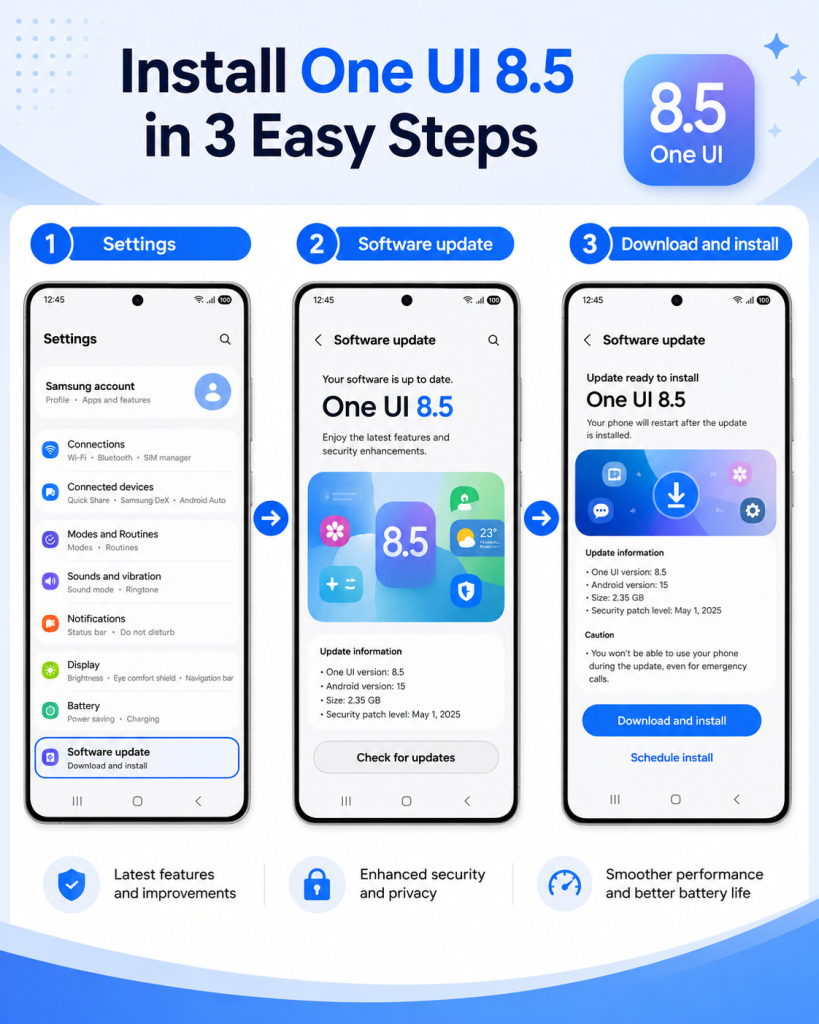
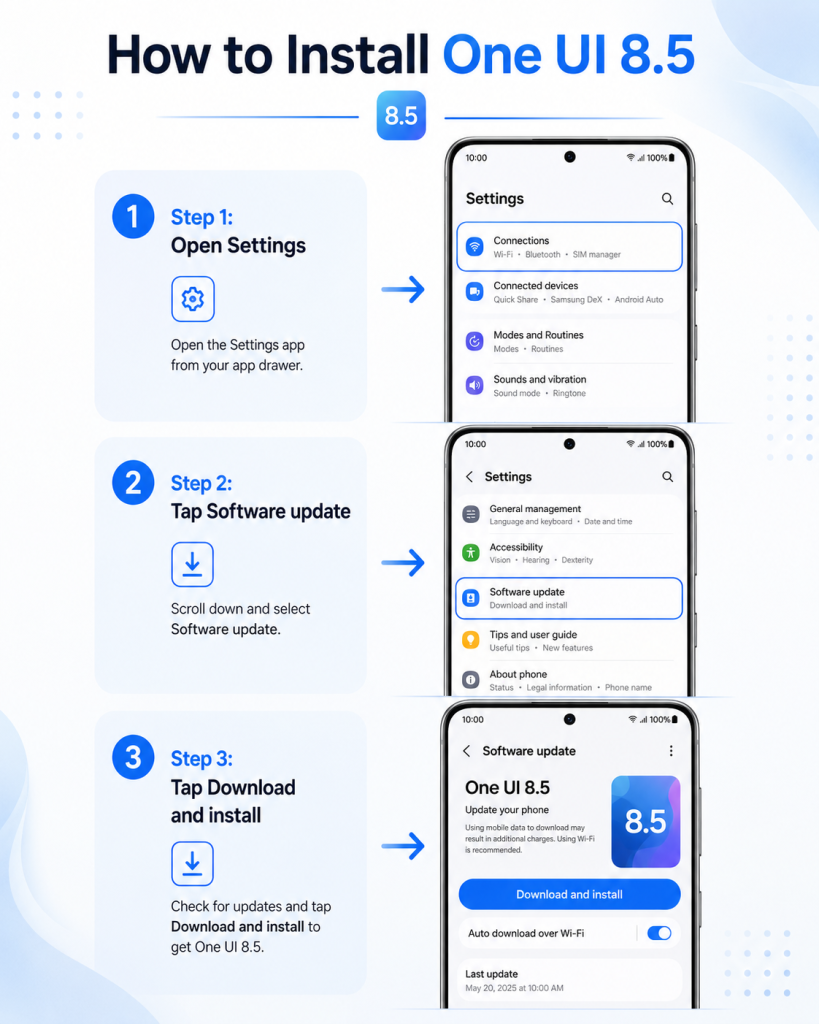
If your device is eligible, you can check for the Samsung One UI 8.5 update manually from settings.
Follow these steps:
- Open Settings on your Samsung Galaxy phone or tablet.
- Scroll down and tap Software update.
- Tap Download and install.
- Wait while your device checks for updates.
- If One UI 8.5 is available, download and install it.
- Keep your device connected to Wi-Fi.
- Make sure your battery is charged before installing.
Samsung officially says users can update One UI by going to Settings > Software update > Download and install, then tapping Check for updates.
Before updating, back up your important data. Most Samsung updates install safely, but skipping backup is still a bad habit. At minimum, make sure your photos, contacts, WhatsApp chats and important files are saved.
Should You Install One UI 8.5 Immediately?
For most users, yes, the One UI 8.5 update is worth installing once it officially appears on your device.
The update brings useful AI features, better customisation, privacy improvements and a cleaner interface. If your phone is eligible and you want the latest features, installing the update makes sense.
But there is one exception.
If your Galaxy phone is your main work device and you cannot afford bugs, wait a few days after the update appears. Early software rollouts can sometimes include small issues, especially across different regions and carriers.
That does not mean One UI 8.5 is unsafe. It just means rushing every update on day one is not always smart.
A sensible rule is this:
If you like testing new features, install it.
If your phone is critical for work, banking, business or travel, wait for early user feedback first.
Samsung One UI 8.5 vs One UI 8: What Changed?
One UI 8.5 is more than a minor update. It improves Galaxy AI, customisation, wallpaper handling, privacy features and overall usability.
The biggest changes include:
- More personalised Galaxy AI suggestions
- Photo Assist improvements
- Now Nudge for real-time suggestions
- AI Agent for faster task handling
- More flexible Quick Panel customisation
- Cleaner Lock screen and wallpaper layout
- Privacy and security improvements
- Better control over Galaxy AI processing
Compared with One UI 8, the One UI 8.5 update feels more focused on practical AI. Samsung is not only changing the look of the interface. It is trying to make the phone more useful during everyday tasks.
That is exactly what modern smartphone updates need. Users do not care about random features they will never open. They care about things that save time, improve photos, protect privacy and make the phone easier to use.
Final Verdict
The Samsung One UI 8.5 update is one of Samsung’s most important software updates of 2026 because it pushes Galaxy AI deeper into daily phone use.
If you own a Galaxy S25, Galaxy S24, Galaxy Z Fold, Galaxy Z Flip or Galaxy Tab model included in Samsung’s confirmed rollout list, this update is worth watching closely.
The strongest features are Photo Assist, Now Nudge, AI Agent, Quick Panel customisation, Lock screen improvements and privacy controls. These are not just cosmetic changes. They are designed to make Galaxy devices smarter and easier to use.
Still, users should stay realistic. Not every feature will be available on every model, language or region. Samsung itself notes that AI feature availability may vary.
If One UI 8.5 is available on your device, install it through official settings only. If it is not showing yet, wait for the official rollout. Forcing unofficial files is not worth the risk.
FAQs About Samsung One UI 8.5 Update
What is the Samsung One UI 8.5 update?
The Samsung One UI 8.5 update is Samsung’s latest Galaxy software update. It brings deeper Galaxy AI integration, improved customisation, privacy features, Photo Assist upgrades, Now Nudge and a cleaner user experience.
Which Samsung phones are getting One UI 8.5?
Samsung has confirmed the rollout for the Galaxy S25 series, Galaxy S25 FE, Galaxy S24 series, Galaxy S24 FE, Galaxy Z Fold7, Galaxy Z Flip7, Galaxy Z Fold6, Galaxy Z Flip6, Galaxy Tab S11 series and Galaxy Tab S10 series.
How do I install One UI 8.5?
Go to Settings > Software update > Download and install, then tap Check for updates. If the update is available for your device, you can download and install it from there.
Why is One UI 8.5 not showing on my phone?
The update may not be available in your region yet. Samsung says rollout timing can vary depending on market and model, so eligible devices may receive the update at different times.
Does One UI 8.5 include Galaxy AI?
Yes. One UI 8.5 includes improved Galaxy AI features such as Photo Assist, Now Nudge and AI Agent. However, availability may vary depending on device model, language and region.
Should I update to Samsung One UI 8.5?
Yes, if the update is officially available for your device. It brings useful AI tools, customisation options and privacy improvements. But if your phone is essential for work, waiting a few days for early feedback is a safer move.